

Helpful resources
BPAY Brand Portal
Explore our BPAY brand guidelines and marketing material to help deliver a consistent brand experience.
AP+ Developer Portal
Explore our APIs to help you develop bill payment solutions to support your business and your customer needs.
CRN Generator Tool
Generate BPAY CRNs specific to your biller code to help you track and reconcile payments.
Bank & Biller Lookup Tool
Check to see if your bank or biller offers BPAY and what options they have available.
Frequently asked questions
Go to:
BPAY for consumers
General information about BPAY
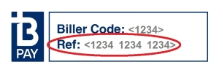
To make sure you always use the right CRN, sign up for BPAY View. All the details are filled in for your approval, so you can be confident they’re correct. BPAY View may not be available for all businesses or financial institutions:
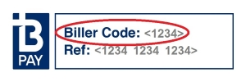
Search for a Biller Code.
Financial institutions may also limit the amount you can pay from a particular account, to a specific business, or on a single day. Please contact the business that issued the bill or your financial institution to find out more.
Paying bills with BPAY
- Log on to your online banking
- Choose the BPAY or bill payment option
- Follow the prompts to cancel the payment
The exact steps you need to take will depend on your online banking. Contact your bank or financial institution if you need to know more.
*Scheduled payments are subject to systems and funds availability.
Search for a Biller to check which type of account they accept payments from.
If this doesn’t work, contact your bank or financial institution.
- Paid too much
- Used the wrong Biller Code or Customer Reference Number (CRN)
- Accidentally paid the same bill twice
If you paid too little, simply make another payment to cover the difference. Remember to check first with your bank or financial institution to see if any extra fees or charges will apply.
Receiving bills through BPAY View
Depending on your financial institution you’ll receive a convenient SMS, email or bank message reminder to pay your bill. Its secure online access makes BPAY View easy to pay your bills on time. And BPAY View is easier on the environment too, with no need to print paper copies.
*If BPAY View is offered by the financial institution and Biller.
- Entering the wrong details
- Registering with more than one bank (if your Biller doesn’t allow multiple registrations)
- CommBank customers please visit here for help with registering
If you've done all this and you’re still having problems, contact your bank or your financial institution.
Some financial institutions even allow you to set up your bills to be paid automatically with Auto Pay.
Contact your bank or financial institution to find out more.
- Log on to your online banking
- Choose BPAY View
- Follow the prompts to select and deactivate the Biller
As soon as you deregister from BPAY View for that Biller, they should start sending your bills in another way (such as by mail, or email). Contact your Biller or financial institution if you need to know more.
BPAY doesn’t receive any of your personal details or account details during the payment process.
Storing bills with BPAY View
- Biller name
- Amount due
- Date due
The business or their bill service provider hosts your detailed bill. It can only be accessed through a secure link from your online bank.
To learn more about the security features of your online banking and how you can help protect your personal information, contact your bank or financial institution.
BPAY for businesses
Billing with BPAY
- Broad acceptance. BPAY has been around since 1997 and is offered by over 140 financial institutions giving your customers a payment method they already know and trust.
- Better cash flow. Your money clears within one banking business day.
- Easy reconciliation. Use BPAY’s unique customer reference number to identify customers easily. You can also control how much and when they pay.
- Smarter billing. Deliver bills straight to your customers’ online banking with BPAY View and save the paper costs.
When a customer pays by BPAY, you’ll have the money in your account on the next Banking Business Day^ – a day when Sydney or Melbourne banks can make settlement – together with your digital payment information for easy reconciliation and payment tracking.
^The process and timing may vary between banks.
- Debit accounts
- Credit card accounts
There is no risk of credit card chargebacks, because the payment is processed through the BPAY system from the underlying account, and not via the credit card. Further, the payment is made from within the secure environment of the customer’s online bank and provides customers with more payment options to meet their preferences.
^The process may vary between banks.
Customer Reference Numbers (CRNs)
You can use CRNs like account numbers, putting the same CRN on every bill you send an individual customer. Or you can use them like invoice numbers, putting a different CRN on each individual bill. We call that a variable CRN, which can be used to track individual transactions for a customer that may receive multiple bills from you within a billing period.
You can even use an Intelligent CRN (iCRN) that ensures customers are only able to pay the exact amount you have specified, or by a particular date you have specified, or both. See What is an Intelligent Customer Reference Number iCRN (below) and how do I set it up? for more information. All CRNs also include a ‘check digit’ validation (below) to ensure that your customers can’t enter the wrong details.
It ensures your customers don’t enter the wrong numbers, or transpose the digits when they are making their BPAY payment. So you can be confident that the bill they paid is the one they meant to pay.
You can use it to set the amount the customer is allowed to pay, or the date the bill must be paid by, or both.
iCRN may be useful for businesses like insurers that do not wish to be bound by a contract unless they receive an agreed amount on time, or where there is a requirement for a specific payment to be made in full or by a specified date, such as a fine or vehicle registration.
Your bank or financial insitution can help you set up iCRN for your bills.
Master Biller & Sub-biller
The Master Biller may be able to assist Sub-billers in the billing, receipting, and reporting for BPAY payments, often in return for a fee. One use case could be for instance when an Accounting Package is a Master Biller and enables their customers to offer BPAY by becoming BPAY Sub-billers through their software.
- Property rental
- Child care
- Education
- Retail
- Strata management
- Building services
- Accounting
- Revenue. Earn revenue from transaction fees paid by your Sub-billers.
- Stronger business relationships. Form lasting relationships with your business customers with value-added services that could save them time and money, including daily bank reconciliation files, automated reconciliation of receivables, receivables management services, outsourced billing services and more.
- Support franchisees. Support franchise arrangements — even gaining visibility of Sub-biller BPAY payment volumes and values.
- Faster cash flow. The Sub-biller enjoys cleared funds in their business account, without the risk of chargebacks.
- Lower overheads. BPAY can assist Sub-billers to streamline their billing and payment reconciliation processes, helping them to reduce overheads.
- Less administration. The Master Biller can take care of analysing receivables transactions, and deals with the Biller Institution for the Sub-biller, freeing up time so they can focus on their business. The Master Biller may even offer a full billing and collection service on the Sub-biller’s behalf.
Sending Bills via BPAY View
With BPAY View, your customers will receive their bills in their online or mobile bank, with the option to pay straight away or schedule payment for later.
- Easy access. Customers whose banks offer BPAY View can access their bills anytime and from anywhere on their online or mobile bank.
- Convenience. Customers can view and pay multiple bills from multiple billers all from the one location, making it faster and easier to pay.
- Choice. Your customers can choose to use any payment method you allow, including BPAY.
- Organisation. Bills can be viewed, paid and stored in one electronic location — no more filing required.
- Use BPAY View to send bills and statements online to your customers’ banking app in bulk – so you save time.
- Deliver bills straight to your customers’ banking platform – so they’re right where they need to be.
- Help your customers to pay on time, with electronic reminders.
- Get paid faster, with cleared funds in your account on the next Banking Business Day (a day where Sydney and Melbourne banks can settle funds).
- Drive traffic to your website by putting links to special offers in your bill.
However, if they do pay by BPAY directly from BPAY View, the Biller Code and Customer Reference Number are automatically filled in and the customer can pay in one click*, making it faster and even more convenient to pay.
We’ll work with you, your bank and your Bill Service Provider to help test and implement your BPAY View system.
When your customers receive their summary bill from their online banking, they can click through to see the detailed bill, driving extra traffic to your site. In this way, you can use your bills to increase customer engagement, or create an effective and targeted sales and marketing tool.
To start the conversation, please contact your bank or financial institution.
- Computershare
- Forms Express
- Fuji Xerox
- Lane Print and Post
- Payreq
- PML
- Zipform
For further information and details on using a Bill Service Provider, you should contact your bank or financial institution and obtain a copy of the relevant documentation.
When they log into their internet or mobile banking, they can view a bill summary in the BPAY View section, which includes information like the Biller, payment amount and due date. Clicking on a link in the bill summary will take them to a more detailed bill that is hosted on your website (or the Bill Service Provider’s site), which can look exactly like a paper bill.
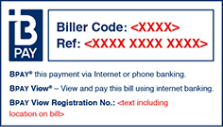
You’ll need to include a payment methods section, with a section for the BPAY logo, Biller Code and Customer Reference Number (CRN). Here’s an example:
BPAY Batch Payments
You need to sign up with your financial institution to become a Batch payer. Contact your bank or financial institution for support.
Troubleshooting
- Paid too much
- Used the wrong Biller Code or Customer Reference Number
- Accidentally paid the same bill twice
- Mistaken payments — your customer makes a mistake when paying you with BPAY.
- Unauthorised payments — access to your customer’s online, mobile or phone bank is compromised by fraud.
- Reversals — a system error has occurred.
- Payment traces — a customer makes a payment, but you don’t receive it.
- Biller-initiated error correction — you receive a payment, but you don’t know who it’s from, or the customer made a mistaken payment.
There are simple procedures for processing these errors that involve both you and your bank. You’ll need to contact your bank or financial institution to find out what to do.
Security
BPAY does not receive any of your customer’s personal or account details during the payment process (except the type of bank account they paid from).
BPAY branding
Note: If you have not updated your bill since 2012, please refer to our new brand guidelines.
General FAQs

AP+ acknowledges the Gadigal People of the Eora nation as the Traditional Custodians of the lands on which we are based and pay our respects to Elders past, present and emerging. We recognise all Aboriginal and Torres Strait Islander peoples' ongoing connection to the lands and waters of Australia and thank them for their pivotal role in caring for Country. Always was and always will be Aboriginal Land.
View our Reconciliation Action Plan

©2026 Australian Payments Plus. All rights reserved
